Getting Started with Melt Ice for Dinos
Your first-hour walkthrough for Fire, ice, Dinos, and base income.
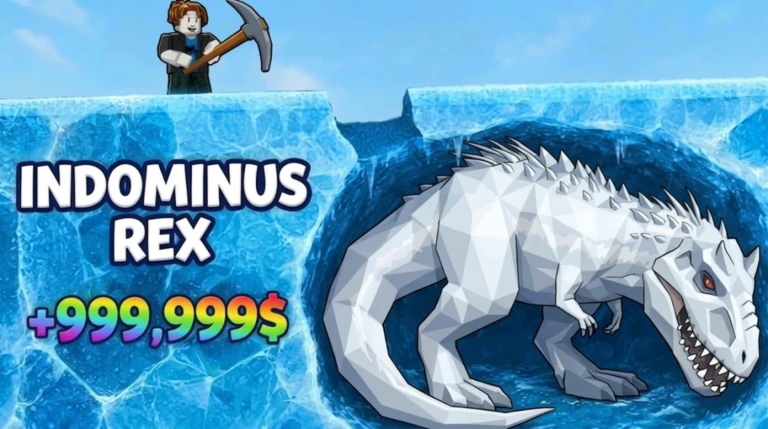
Welcome to +1 Melt Ice for Dinos
+1 Melt Ice for Dinos! is a free Roblox simulation / tycoon experience by Cryosaur Studios. The fantasy is simple and addictive: every click gives you +1 Fire, Fire melts ice, melting frees frozen Dinos, and Dinos you carry home generate money—including while you are offline. This guide covers the first hour so you avoid wasting Fire on ice you cannot finish and money on the wrong upgrades.
Play on Desktop, Mobile, Console, or Tablet. Servers hold up to six players. Favorites and visits climb quickly after each world update, so expect busy servers during Admin Abuse events.
The core loop in five steps
- Click / hold to build Fire power (the HUD counter climbs with every hit).
- Aim at ice until the block melts and a Dino pops free.
- Pick up the Dino and carry it back to your personal base.
- Place the Dino on a pad so it starts earning money.
- Spend money on stronger torches and upgrades, then walk to deeper ice for rarer finds.
Repeat. Offline earnings keep ticking after you leave, which is why placing even Common Dinos early matters.
First ten minutes checklist
- Finish the onboarding prompts if the game shows any.
- Melt the closest soft ice and place your first Dino immediately.
- Open Settings → Codes and redeem everything listed on the Codes Hub (THANKSGIVING, WORLD2, and any newer strings).
- Buy the cheapest torch upgrade that visibly speeds melting.
- Ignore deep caves until your Fire clears starter ice in a few seconds.
Players who skip codes and torch shopping often bounce off thick ice and quit. Free rewards plus a better torch fix that frustration in under a minute.
Understanding Fire vs money
Fire is your melting resource. It rises with clicks and some boosts, and it is the currency rebirth cares about. Money comes from placed Dinos and funds the shop. Rebirth (covered in depth in How to Rebirth) resets Fire while keeping money and placed Dinos—so your base is permanent progress, while Fire is a renewable push resource.
If melting feels slow, you need more Fire or a better torch—not more Common Dinos cluttering the inventory. Read Fire, Torches & Upgrades once you can afford the second shop tier.
Carrying and placing Dinos
Freed Dinos must be carried home. Plan short trips at first: melt near the base, place, then walk farther. When you free something glowing or labeled Legendary, stop farming Commons and escort that Dino home first. Rank keepers using the Tier List Hub.
Full pads? Sell the weakest earner. Empty pads while you explore waste the idle system that makes this game friendly for short sessions.
When to leave the starter zone
Leave the tutorial ice field when:
- Your torch upgrade makes local ice melt almost instantly.
- You have at least a few placed earners funding the shop.
- You redeemed current codes for boosts.
Then follow the routes in Zones & Worlds toward World 2 content and rarer biomes. Deeper ice hides better Dinos but punishes under-upgraded Fire.
Controls and platforms
On desktop, click or hold to apply Fire; use standard Roblox movement to carry Dinos. On mobile, tap the melt control and use the virtual joystick. Console players map melt to the primary action button—check the in-game prompt if your layout differs. The Players Hub collects extra control tips and etiquette for shared servers.
Common beginner mistakes
- Rebirthing with zero placed Dinos — you keep money, but you stall income.
- Walking into deep ice with a starter torch — Fire drains while the block barely chips.
- Ignoring codes — free multipliers are designed for early acceleration.
- Hoarding Commons — sell duplicates; pad quality beats pad quantity.
- Stacking unknown scripts on day one — learn the loop first; see Scripts later if you accept the risk.
What to read next
- Codes Hub — claim free rewards.
- Fire, Torches & Upgrades — shop order.
- How to Rebirth — first reset timing.
- Tier List — which Dinos to keep.
- Updates — World 2 / World 3 / holiday notes.
Master the melt-and-place rhythm, and the rest of Melt Ice for Dinos becomes a satisfying upgrade treadmill instead of a wall of unbreakable ice.
Frequently Asked Questions
Quick answers about Melt Ice for Dinos.
How do I play Melt Ice for Dinos as a beginner?
Click to gain Fire, melt nearby ice, carry freed Dinos to your base, place them for money, redeem codes, then buy torch upgrades.
Does the game work on mobile?
Yes. Cryosaur Studios lists Desktop, Mobile, Console, and Tablet support.
Do I earn money while offline?
Yes. Placed Dinos continue generating money while you are away, which is why early placements matter.
Where should I go after the tutorial ice?
Upgrade your torch, redeem codes, then push toward deeper zones and World 2 as covered in the zones guide.